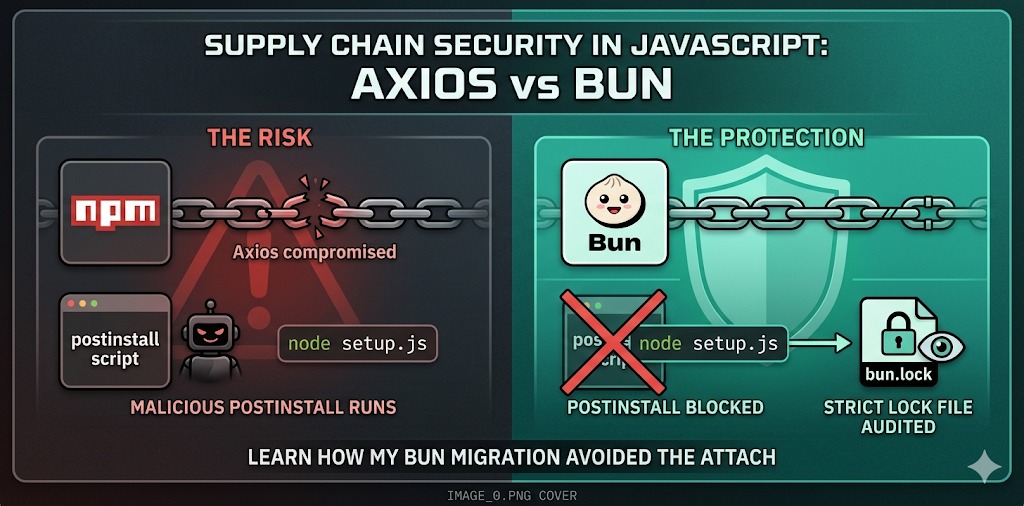
Supply Chain Attack on Axios: Why My Migration to Bun Saved Me
TL;DR: On March 31, 2026, the Axios package — with over 100 million weekly downloads — was compromised by a North Korean state actor. The attack vector was a malicious
postinstallhook. I was not affected. Not by luck, but by architectural choices made well in advance.
The Calm Before the Storm
You probably use Axios. Or you have at some point. Or you depend on a library that depends on it. With over 100 million weekly downloads on npm, Axios is one of the most ubiquitous packages in the entire JavaScript ecosystem — a piece of infrastructure so common that many developers don’t even realize it’s there.
And it was precisely that ubiquity that made it a target.
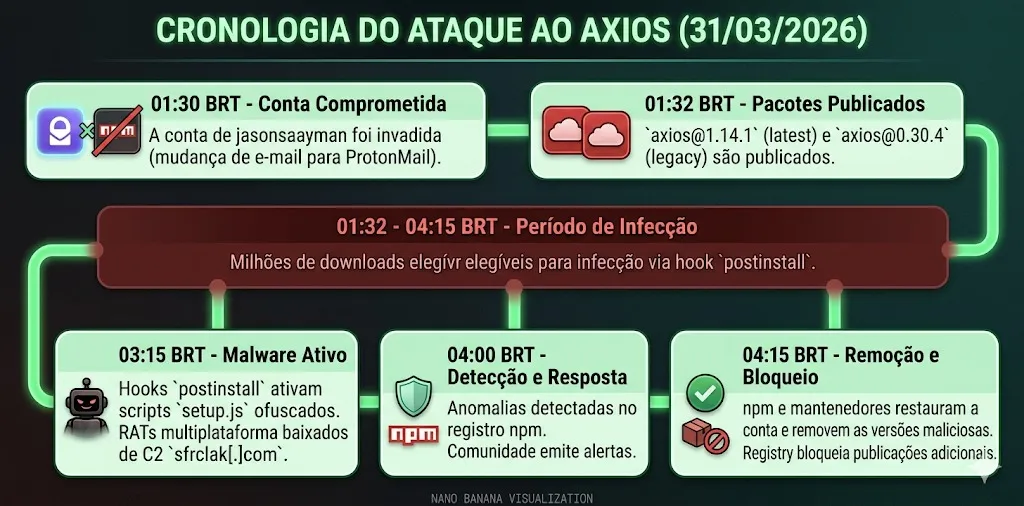
In the early hours of March 31, 2026, an attacker compromised the npm account of the project’s lead maintainer (jasonsaayman), published two poisoned versions of the library, and in less than two seconds after an npm install, developer machines around the world were sending data to a command-and-control server in North Korea.
The Problem: Anatomy of a Supply Chain Attack
How the account was compromised
The attacker didn’t need to hack the Axios source code. They simply took over the maintainer’s identity — changing the registered email on the npm account to a ProtonMail address under their control — and published two seemingly legitimate new versions:
axios@1.14.1(taglatest)axios@0.30.4(taglegacy)
Any project with "axios": "^1.14.0" in its package.json was eligible to receive the malicious version on its next install. Without a single change to the Axios code itself.
The weapon: the postinstall hook
The surgical modification was the inclusion of a single new dependency: plain-crypto-js@4.2.1. This phantom package was never imported by the Axios code. Its sole purpose was to declare a postinstall hook that automatically executed a setup.js script during installation.
// malicious plain-crypto-js package.json
{
  "scripts": {
    "postinstall": "node setup.js"
  }
}
The setup.js used two layers of obfuscation (reversed Base64 + XOR cipher with the key OrDeR_7077) to hide its logic. Once decoded, the script detected the victim’s operating system, contacted the C2 server at sfrclak[.]com:8000, and downloaded a platform-specific RAT (Remote Access Trojan) — PowerShell for Windows, C++ for macOS, Python for Linux.
The malware then erased all of its traces, swapping the compromised package.json with a pre-prepared clean version. Anyone inspecting the node_modules folder after infection would find absolutely nothing suspicious.
The scale of potential damage
The malicious versions were available for approximately two to three hours before being removed. During that window, any environment that installed Axios was at risk of having exposed: cloud credentials (AWS, GCP, Azure), SSH keys, API tokens, CI/CD secrets, and much more. Attribution for the attack pointed to the Sapphire Sleet group, a North Korean state actor also tracked as UNC1069 and TeamPCP — the same group responsible for compromising Trivy, KICS, and LiteLLM in the preceding weeks.
My Response: Two Decisions That Made the Difference
When the incident came to light, my first reaction was to check my projects. And the second was a quiet sense of relief: I had already taken the right precautions, months earlier, for reasons that had nothing to do with this specific attack.
1. Strict lock files as the first line of defense
The most direct protection against this attack was trivial: having a lock file with exact versions and using it strictly.
Projects that had axios@1.14.0 pinned in their lock file and ran npm ci (which respects the lock file and does not upgrade versions) simply never installed 1.14.1. I had migrated all of my projects to this practice — committing the lock file, never using npm install in CI, and auditing the package-lock.json or bun.lock with the same attention I give to package.json.
The conceptual difference matters: package.json says what you want. The lock file says what you actually installed. Treating the lock file as a disposable artifact means giving up traceability over your dependencies.
2. Migrating to Bun: postinstall disabled by default
This was the decision that protected me most at a structural level.
Bun does not execute postinstall scripts by default. While npm runs any lifecycle hook without warning, Bun takes a conservative stance: install scripts are considered opt-in behavior, not opt-out.
# With npm: postinstall runs automatically, no questions asked
npm install axios

# With Bun: postinstall is ignored by default
bun install axios
# To explicitly enable scripts (when needed):
bun install --trust axios
This behavior is not a design accident — it’s a philosophy. The attacker built the entire compromise chain on the premise that node setup.js would run automatically. With Bun, that premise simply does not hold.
Real-World Cases: Where I Applied This
These are not theoretical practices. I applied them concretely in active projects:
Legislative Management Portal
The City Council’s institutional system uses Bun as its runtime and package manager at every stage — from local development to the CI pipeline. The lock file is treated as a security artifact: any divergence between bun.lock and node_modules is cause for alarm, not for a bun install --force. postinstall scripts are manually audited before being allowed via --trust.
Brokerage Management System
Since this system handles sensitive financial data, dependency management here is even more rigorous. Beyond strict lock files, the update process for any dependency goes through a manual review of the lock file diff — exactly the kind of check that would have revealed the addition of plain-crypto-js before any installation.
The Outcome: Immunity by Design, Not by Luck
When the incident came to light, I didn’t need to:
- Check whether I had installed the compromised versions
- Rotate credentials in a panic
- Audit network logs for connections to
sfrclak[.]com - Rebuild environments from scratch
Not because I knew about the attack beforehand. But because the practices were already in place.
The SANS Institute put it well: “Organizations that had lock files pinning Axios to a specific version, or CI/CD policies that suppress automatic install scripts, were protected.” That was exactly my scenario.
Lessons That Stick
This incident was not an exception — it was a confirmation. Supply chain attacks in the npm ecosystem are becoming more sophisticated, more frequent, and attributed to actors with serious capability and motivation. The group responsible compromised four open-source projects in less than two weeks before reaching Axios.
The practices that make a real difference are simple but require discipline:
Treat your lock file as code. Commit it, review update diffs, and use bun install or npm ci instead of npm install in automated pipelines.
Question the postinstall. Most packages don’t need to execute code at install time. When they do, you should know why. Bun makes this explicit by default.
Monitor transitive dependencies. Axios itself didn’t have a single line of malicious code. The threat was two levels deep in the dependency tree. Tools like Socket.dev and Snyk scan at that deeper level.
Adopt exact versions in critical contexts. The ^ operator in package.json is convenient, but it silently delegates update decisions to the registry. In systems handling sensitive data, that convenience comes at a cost.
Conclusion
The Axios attack was a brutal reminder that modern software security doesn’t end with the code you write — it extends across the entire toolchain and dependency graph you rely on. A single compromised maintainer, in a single popular package, was enough to create an attack vector with a potential reach of hundreds of millions of installations.
There is no silver bullet. But there is posture. And security posture is built through everyday decisions — like which package manager to use, how to treat a lock file, and how much implicit trust you delegate to the registry.
I migrated to Bun and strict lock files for performance and consistency reasons. Security turned out to be a benefit I didn’t expect to need so soon.
I’m glad I already did.
Do you use Bun in your projects? How do you manage dependency security in your workflow?